
Excel shortcuts with letters
List of Excel shortcuts with letters. Studies (e.g., Lee, Shifflett, and Downen, 2019) find that use of Excel Shortcuts improves performance by 13.7%. Here is a list of Excel Shortcut Keys with letters.
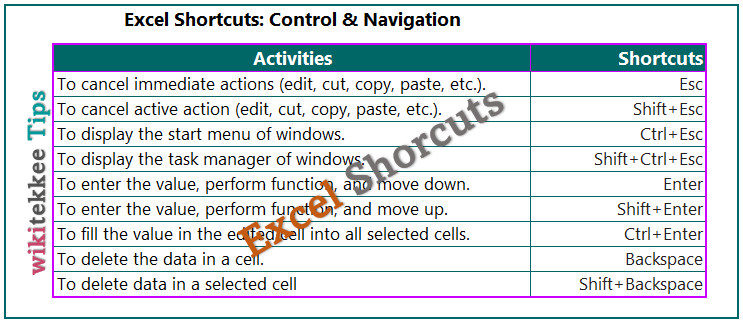
| To select all or the current region. | Ctrl+A |
| To insert formula arguments. | Shift+Ctrl+A |
| To apply bold letters, numbers, and characters. | Ctrl+B |
| To copy data to be pasted to another cell. | Ctrl+C |
| To fill down. | Ctrl+D |
| To display the find and replace box. | Ctrl+F |
| To display the format cells dialog box. | Shift+Ctrl+F |
| To display the go To dialog box. | Ctrl+G |
| To display the find and replace dialog box, replace tab. | Ctrl+H |
| To apply italic formatting. | Ctrl+I |
| To display the insert hyperlink dialog box. | Ctrl+K |
| To display the create table dialog box. | Ctrl+L |
| To Toggle auTofilter. | Shift+Ctrl+L |
| To create a new workbook. | Ctrl+N |
| To display the open dialog box. | Ctrl+O |
| To select the frst cell containing a comment. | Shift+Ctrl+O |
| To display the print window. | Ctrl+P |
| To display the format cells dialog box, font tab. | Shift+Ctrl+P |
| To fill right. | Ctrl+R |
| To save the workbook. | Ctrl+S |
| To display the create table dialog box. | Ctrl+T |
| To Toggle the Total row (when the table is selected). | Shift+Ctrl+T |
| To Toggle the underline format. | Ctrl+U |
| To paste the copied data. | Ctrl+V |
| To display the paste special dialog box. | Ctrl+Alt+V |
| To close the window. | Ctrl+W |
| To cut to be pasted in another cell. | Ctrl+X |
| To redo the immediate action. | Ctrl+Y |
| To undo the immediate action. | Ctrl+Z |
References:
Advertisements
Lee, L., Shifflett, E., & Downen, T. (2019). Teaching excel shortcuts: A visualization and game-based approach. Journal of Accounting Education, 48, 22-32.
Further readings: